
Each month out of the year, I aim to make at least two or more posts. One of those posts will always be a Monthly Recap to recount what occurred during that time. One month complete, so here is the summary of my experiences from January.
First Steps
 I have been meaning to get back into Unreal Engine for some time. January began with a fresh install of Unreal Engine 4.10. With a project in mind, I began with the absolute basics. That seemed like a good place to start. The project was not the first order of business though. UE4 comes with a wealth of example projects and documentation right out of the box.
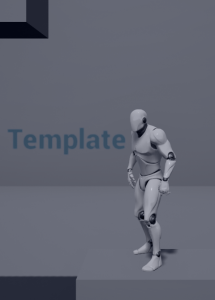
I looked into the Paper 2D template, and found it lacking in what I had in mind. The platformer template was much closer. It allowed me to flex my experience and creativity in 3D, while still simplifying the movement mechanics to only two axes. I was pleasantly surprised when I plugged a Dualshock 4 controller into my computer and was immediately able to run and jump around the template’s example level with a fully animated stock character.
I began tweaking values and sliders to see what sort of things I could do with minimal effort. This, of course, did not meet the standard I was aiming for. I began searching the internet for tutorials that met some of the specifics I wanted to create. User created tutorials were sparse. I imagine this is due to Unreal Engine’s marketplace, where users can sell visual assets, audio, Blueprints, and anything else a developer might not want to create themselves. I’ll admit that I was tempted. There are some cool things on there. For the sake of adding new skills to my arsenal, I opted to build everything myself.
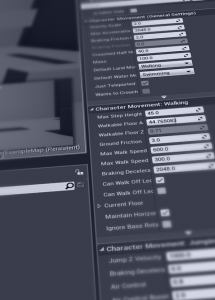 I decided to pick a tutorial and go. So I started with UE4’s own 3rd person character controller tutorial. This turned out to be a great starting point. The tutorial starts with walking you through setting up an actor object, complete with camera, animation states, animation blends, crouch, prone, jump, and sprinting states.
At this point I may have committed a very common mistake. As soon as I got to the part where I was supposed to download and import UE4’s stock character model and animation pack, I thought to myself “I’d rather use my own”. This thought has gotten me into trouble more often than I would like to admit. UE4 was put on hold.
Concept Artists
I haven’t drawn with any regularity in years. I didn’t trust myself to generate the level of quality I wanted. I decided that in order to achieve a level of detail that I would be happy to look at for the duration of my research, I would commission an artist to design the character I had in mind. This is not a good habit to have if you ever want to finish a game. Concept art is typically started much further down a game’s development road-map.
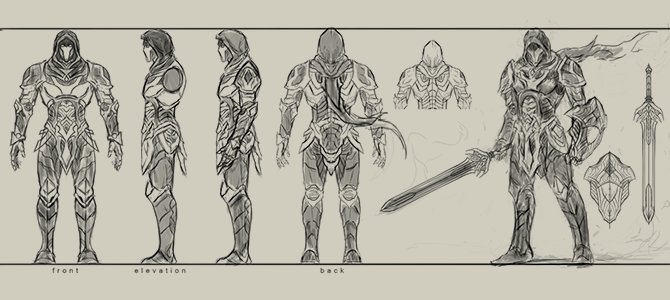
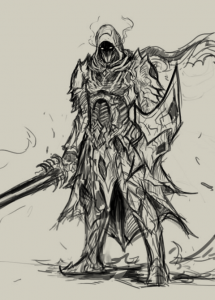 I searched the internet for portfolios of concept artists that matched the style I wanted to achieve. I wanted some simple orthographs drawn. The character would be used throughout the first steps of development. I had an idea of what my vertical slice would look like, so I felt it was okay to continue down this path. I justified it with the idea that I was re-familiarizing myself with Maya.
So I started browsing Reddit. I found some portfolios while I was looking in /r/gameDevClassifieds, a subreddit that doesn’t frequently get new threads. The ratio of useful posts to “Make my MMO for me” is staggering. I found a thread that was about a year old and decided to reach out.
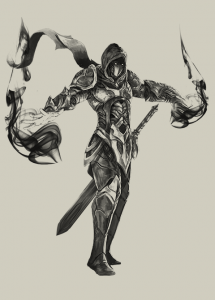 Rough colorless orthographs of a single character was all I needed. Keeping it simple for the sake of time and cost. I didn’t think a professional concept artist would be interested in such a simple request. Nakarin got back to me; we worked through the concepts to a final product.
I started writing up several design documents, one of which was a rough outline for the game’s story. “Kin” was one of the story’s oldest characters, and there were a lot of him. Kin easily fits into the “clone soldier” story trope. So he was perfect for the vertical slice, where everyone was fighting each other with the exact same character model. Sometimes limitations can produce effective results.
Placeholder Assets
My plans were more detailed, and my orthographs were complete. I began the process of making the game’s first character asset. My 3D modeling skills had suffered over the years, but after scrapping a few bad (see: lazy) attempts, Kin was beginning to take shape. I added some color, and decided to skip textures and UV mapping entirely. This was a “placeholder” asset after all.
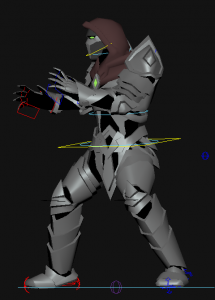 Before I could animate him, Kin needed a rig. Unreal Engine conveniently comes with a Maya plugin for rigging that does a lot of the heavy lifting for you. A majority of my time was spent painting weights. Eventually I was content with the quality of the rig. My common sense was starting to kick back in. I had planned to make every animation, to better prepare for the development process. Instead I made two rough animations. One was Kin standing there looking smug, and the other was him posing like a wrestler about to throw someone. The 2nd one was not intended to look that way, but UE4 was waiting.
The model, rig, and animations easily imported into the original platformer template project. I was relieved to see it working without having to redo anything. Although I was getting an enormous list of warnings from UE4 about Kin’s left shoulder joint, I decided to ignore them for now since I was itching to start that 3rd Person control tutorial.
Closing Summary
I now have a character, some animations, and a rough asset pipeline to work with. I can’t say I’ve made progress on the actual game, but I’ve gained confident understanding of the asset pipeline I’ll be using. New knowledge is another tool in my toolbox. I’m slowly gaining momentum. Morale is high as I move into February.